AWS Secrets Manager vs. Systems Manager Parameter Store
When should you use AWS Secrets Manager versus Systems Manager Parameter Store to store your secrets in AWS? They have similar functionality, but when does…

When should you use AWS Secrets Manager versus Systems Manager Parameter Store to store your secrets in AWS? They have similar functionality, but when does it make sense to use one over the other?
Regardless of whether you are studying for the AWS Certified Security Specialty exam, or you need to use one of these services on the job, this post will help you understand the pros and cons of each approach. We’ll start off by briefly explaining each service in case you’re not already familiar, and then we’ll dive into more specific implementation details.
AWS Secrets Manager
AWS Secrets Manager is a managed service that helps you store, retrieve, and manage sensitive information. It was designed from the ground up to store secrets, which makes it ideal for storing database credentials, API keys, authentication tokens, and just about any other type of secret value.
Instead of hardcoding credentials directly in your application code or configuration files, you can retrieve them programmatically from Secrets Manager at runtime. That way, when credentials need to change, you update them in one central location rather than tracking down every instance where they’re hardcoded across your infrastructure.
As an added benefit, you no longer risk accidentally publishing credentials to a git repository, which is still a leading cause of breaches in the cloud. This is more secure and makes credential management significantly easier.
If you’re not already familiar with Secrets Manager, catch up to speed with this video lesson from our free AWS Security Specialty certification course.
AWS Systems Manager Parameter Store
AWS Systems Manager Parameter Store (usually just called Parameter Store or SSM Parameter Store) is a managed service used to store configuration values and secrets in a centralized, secure location.
It’s commonly used to store application configuration values, feature flags, database connection strings, API keys, environment variables, and other parameters that your systems need at runtime.
Many AWS services integrate directly with Parameter Store, including ECS, EC2, Lambda, CodeBuild, and CloudFormation, and this integration makes it so that your applications can retrieve these values without hardcoding anything in your codebase. That reduces the risk of leaking sensitive values in Git repositories and gives you a single source of truth for configuration.
If this sounds similar to Secrets Manager, that’s because it is. So now, let’s focus on their differences and let’s talk about when to use which with scenarios.
When should you use which?
Parameter Store is ideal for:
- Non-sensitive configuration (app settings, environment variables, toggles)
- Feature flags
- Values that rarely change and get used by your services/apps
- SecureStrings that you rotate manually
- Cost-sensitive workloads (Parameter Store is mostly free; Advanced parameters cost extra, but still much less than Secrets Manager)
- When you already rely heavily on Systems Manager and don’t want to introduce yet another service
Downsides of Parameter Store:
- No resource-based policies to protect your secret. You’re at the mercy of IAM policies (although you can and should also use SCPs and RCPs) so it is easier to make access control mistakes with misconfigurations compared to Secrets Manager. Caveat to this: Cross-account sharing requires Advanced parameters and AWS Resource Access Manager (AWS RAM). Parameter Store supports resource policies for this sharing, but Secrets Manager offers more flexible resource-based policies for controlling access directly on individual secrets.
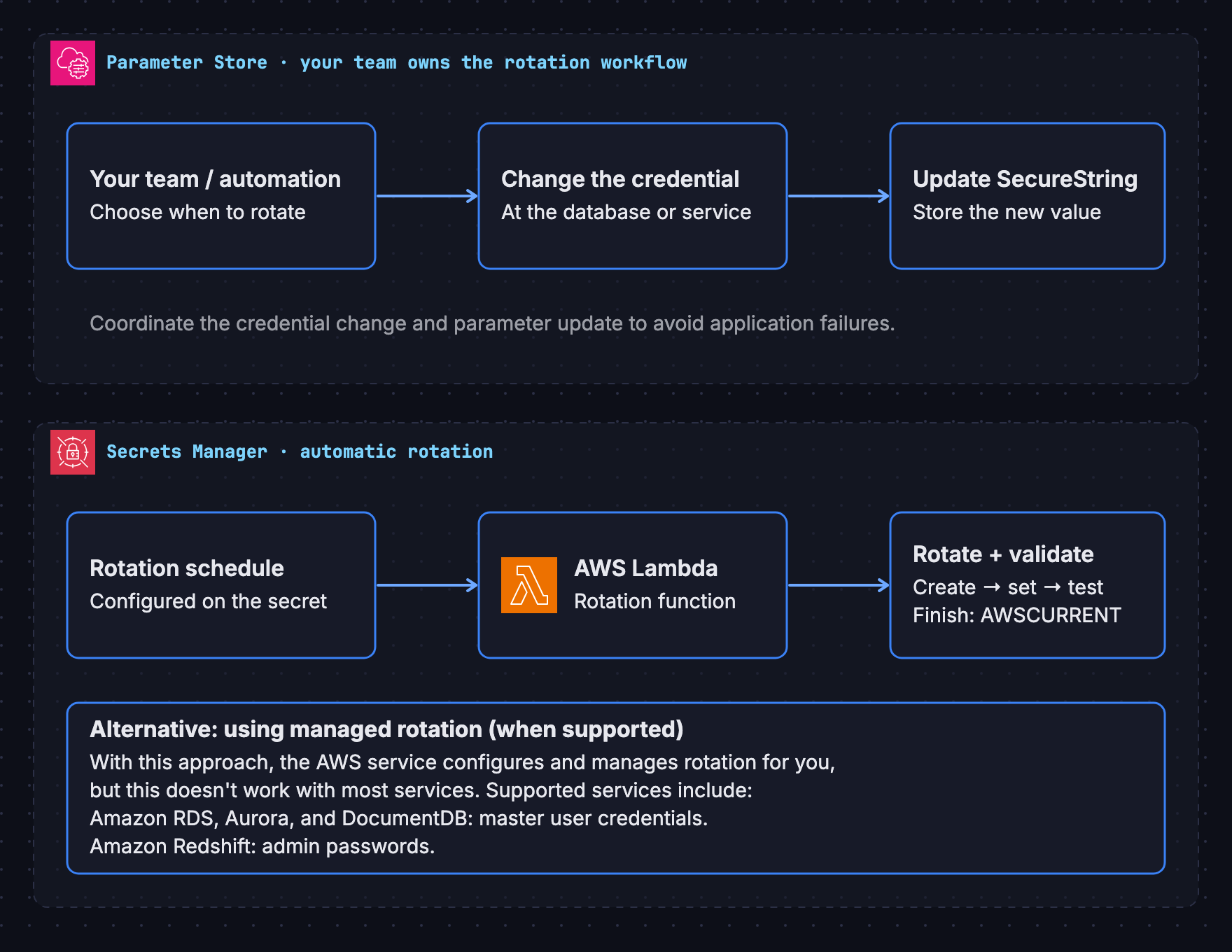
- No built-in/automated rotation of secrets which means you either aren’t rotating them or you have to build your own automation and schedule
Secrets Manager is ideal for:
- Important secrets used for critical apps (passwords, API keys, tokens, database credentials)
- When cost is no concern
- Automated secret rotation (built-in rotation workflows for RDS, Redshift, DocumentDB, etc.)
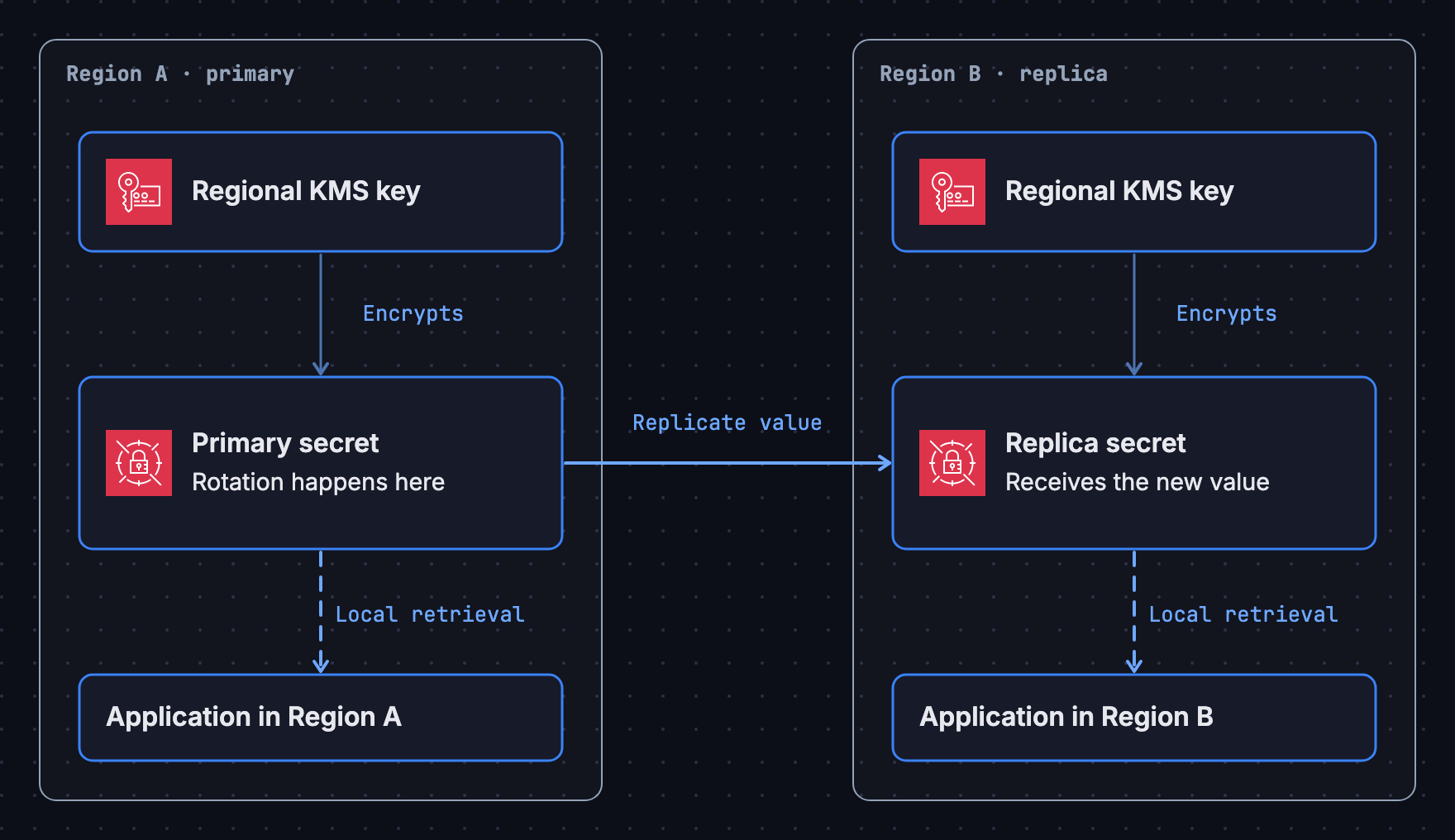
- Multi-region secret replication
- Cross-account secrets sharing
- Managed database credentials (RDS, Aurora, and Redshift offer native integration with credential rotation)
Downsides of Secrets Manager:
- Cost – you’re not only charged per secret per month, but replicas are treated as distinct secrets, immediately doubling cost if you enable them. You are also charged per 10,000 API calls. (Always check pricing since AWS can change this at any time)
- Introducing yet another service that you have to learn, configure, and manage (especially if your org already uses SSM, which is common)
Think of it this way:
As a simple “cheat sheet” of when you should use which, our recommendation would be:
- Parameter Store = storing configuration data + simple secrets
- Secrets Manager = storing important secrets that require automation
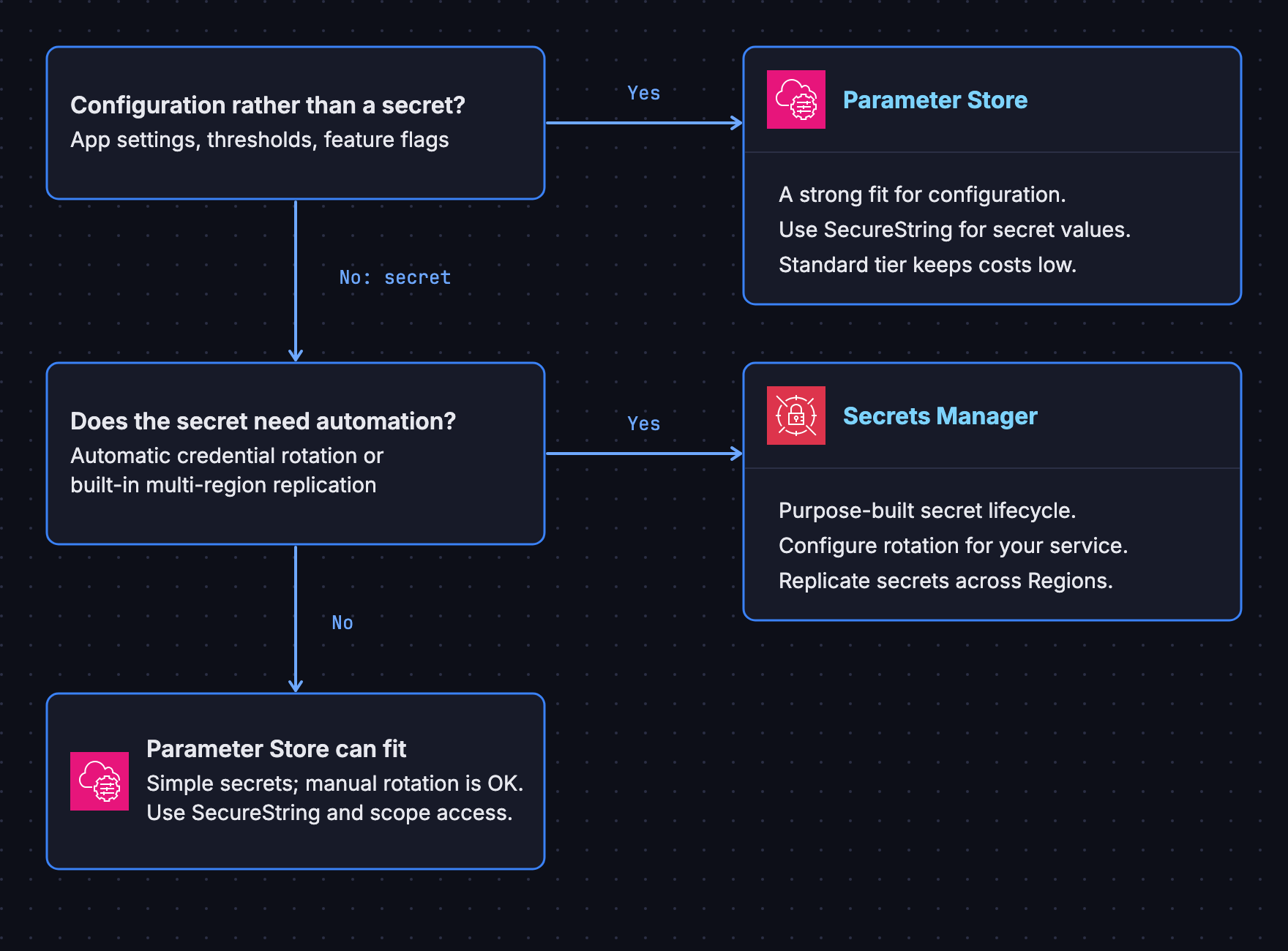
Parameter Store is an older service that’s multi purpose and wasn’t necessarily designed with secrets in mind, but you can make it work. Secrets Manager instead was later purpose-built for storing secrets, and it charges a premium for doing so.
For the Security Specialty exam
If you’re studying for the exam and you see questions related to this, pay attention to keywords in the scenario:
- If you see words like cost savings, config values, feature flags, or “no rotation required,” think Parameter Store
- If you see rotation, database credentials, multi-region, cross-account, or highly sensitive data, think Secrets Manager
For real-world applications
In real-world, practical applications, it’s preferable to use Secrets Manager secrets since by default they are more secure, and they have more advanced features especially around rotation, cross-account access and cross-region replication.
One of those security advantages is that Secrets Manager supports resource-based policies, giving you an extra layer of protection. With Parameter Store, you’re relying primarily on IAM policies to control access (although Advanced parameters also support resource policies for cross-account sharing through AWS RAM). If someone misconfigures an IAM policy, your secrets could be exposed without you realizing it. With Secrets Manager, you can attach a policy directly to the secret itself that explicitly denies access to everyone except specific principals, regardless of what IAM permissions they have. This defense-in-depth approach means a single misconfiguration is less likely to result in unauthorized access, which is a pretty big deal when it comes to secret values.
However, if you don’t need those features, are trying to reduce costs, aren’t dealing with super sensitive secrets, or are already using Parameter Store, you might just prefer sticking to that. Plenty of organizations that I’ve talked to or worked with have used Parameter Store for secrets because it gets the job done just fine at a fraction of the cost, and they don’t need the fancy bells and whistles. They perform regular audits for their secret’s access control, and they’ve accepted the risk.
What the AWS exams expect (practice exam questions)
Again, if you’re here because you’re studying for an AWS certification exam, here are a couple of scenarios to help you:
Scenario #1
Your application stores multiple configuration values (including feature flags, environment settings, thresholds) and 3 API keys. Rotation isn’t required, but the organization likes to rotate secrets every 1-3 years.
Correct choice: Parameter Store
Because:
- Most values aren’t sensitive apart from the API keys
- The SecureString API keys can easily be manually rotated every 1-3 years
- Cost for this would be very low
- No rotation / replication / cross-account needed
Scenario #2
You run a production Aurora PostgreSQL cluster. Your organization can’t have long-lived DB credentials, and the security team requires automatic rotation every 90 days for compliance. Multi-region failover is also being designed, and the security team needs to be able to audit credentials access.
Correct choice: Secrets Manager
Because:
- Native RDS/Aurora credential rotation
- Automatic rotation workflows with Lambda
- CloudTrail logs every access
- Multi-region replica secrets is easy to enable
- Designed specifically for database credential lifecycle management
Conclusion
Hope this article gave you a better understanding of when to choose Secrets Manager over SSM Parameter Store (and vice versa) regardless of whether you need to know for your job or for an AWS certification exam.
If you are studying for the AWS Certified Security Specialty, did you know we offer a completely free and high quality course that contains everything you need to know to pass the exam? Enroll here for free:

Or if you’re part of a team, we offer cloud security team training to help you learn how to securely build in the cloud with practical, hands-on training.