


The Azure model
Azure separates identity from resources. This separation is one of the most important ideas in the course.
The model is simple:
- A directory holds identities.
- A subscription holds resources and receives the bill.
If you come from AWS, this is a totally different model, so let’s talk more about the differences.
How this differs from AWS
An AWS account contains resources and identity controls. EC2 instances, S3 buckets, IAM users, roles, and policies all connect to one account number (the AWS Account ID).
Azure uses two containers instead of one: a directory handles identity, while a subscription holds the resources.
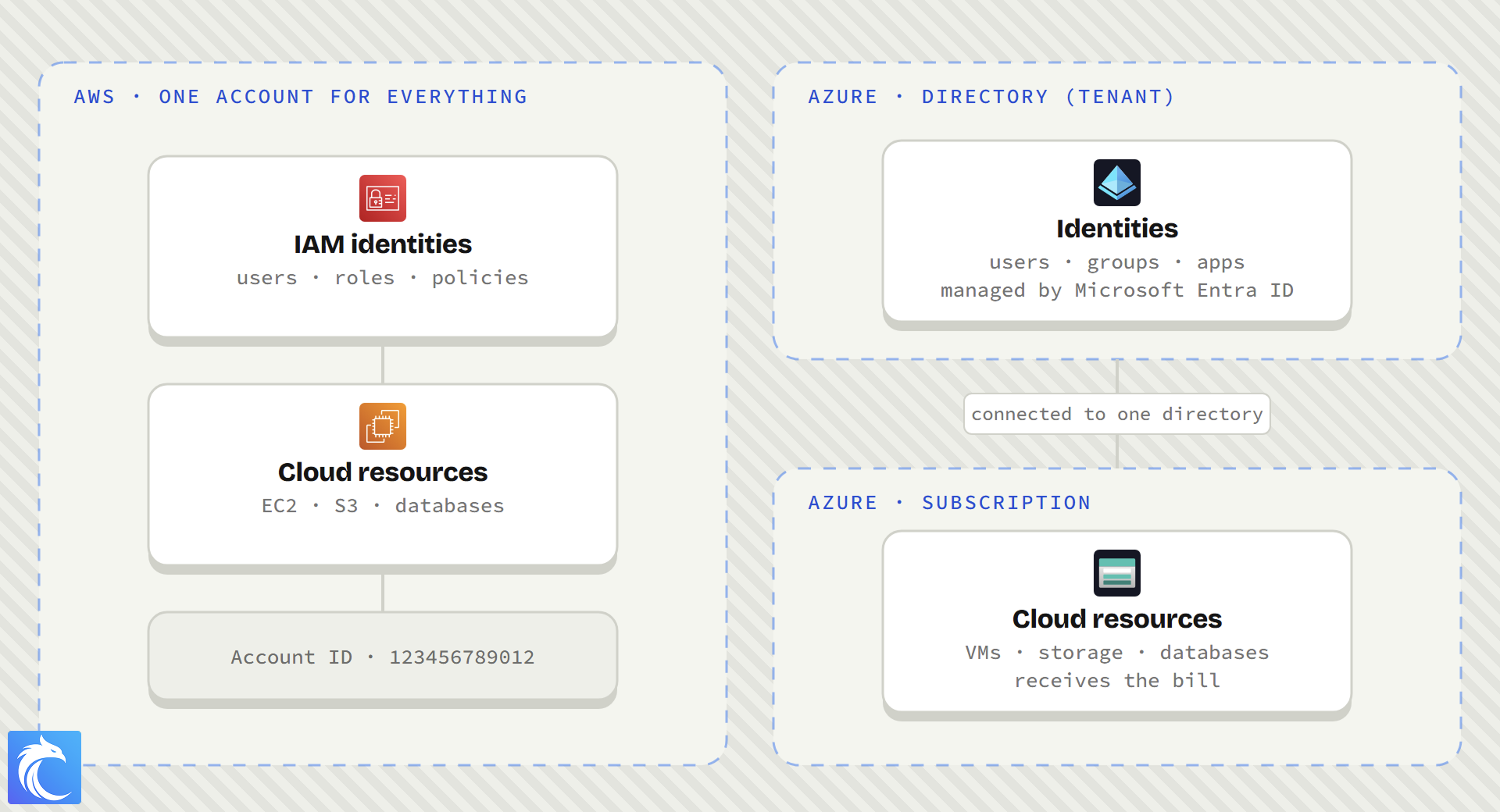
This difference often feels strange to people who know AWS. That reaction is normal during the first week, but keep going and it will start to make sense. I was personally super confused at first, and then I realized that I really liked this approach. It makes some things a lot easier than in AWS.
The subscription holds resources
An Azure subscription is a container for cloud resources. Virtual machines, storage accounts, and databases each belong to one subscription.
The subscription also receives usage charges. Azure applies service limits and quotas at the subscription level.
Each subscription has a subscription ID. The ID uses a format such as 4f8c0e1a-....
Think of the subscription as the place where the company builds and pays for cloud resources.
The directory holds identities
An Azure directory holds identities. These identities include users, groups, applications, services, and automated tools.
Microsoft also calls a directory a tenant. Microsoft Entra ID, which you might have heard about before, is the service that manages the directory. Microsoft called this service Azure Active Directory before 2023. Older lessons and tools can still use that name.
You can see three related names in Azure documentation:
- Directory
- Tenant
- Microsoft Entra ID
Directory and tenant refer to the identity container. Microsoft Entra ID is the identity service.
Each directory has a tenant ID. A tenant ID looks similar to a subscription ID, so read the label carefully or you might mix them up.
How Azure connects them
A subscription connects to one directory at a time. One directory can connect to many subscriptions.
Azure uses the directory and subscription during every access decision:
- The directory identifies you.
- The subscription contains the resource that you want to use.
- Azure reads your role at the applicable scope.
- Azure permits or refuses the action.
The directory answers, “Who are you?” The role assignment answers, “What can you do here?”
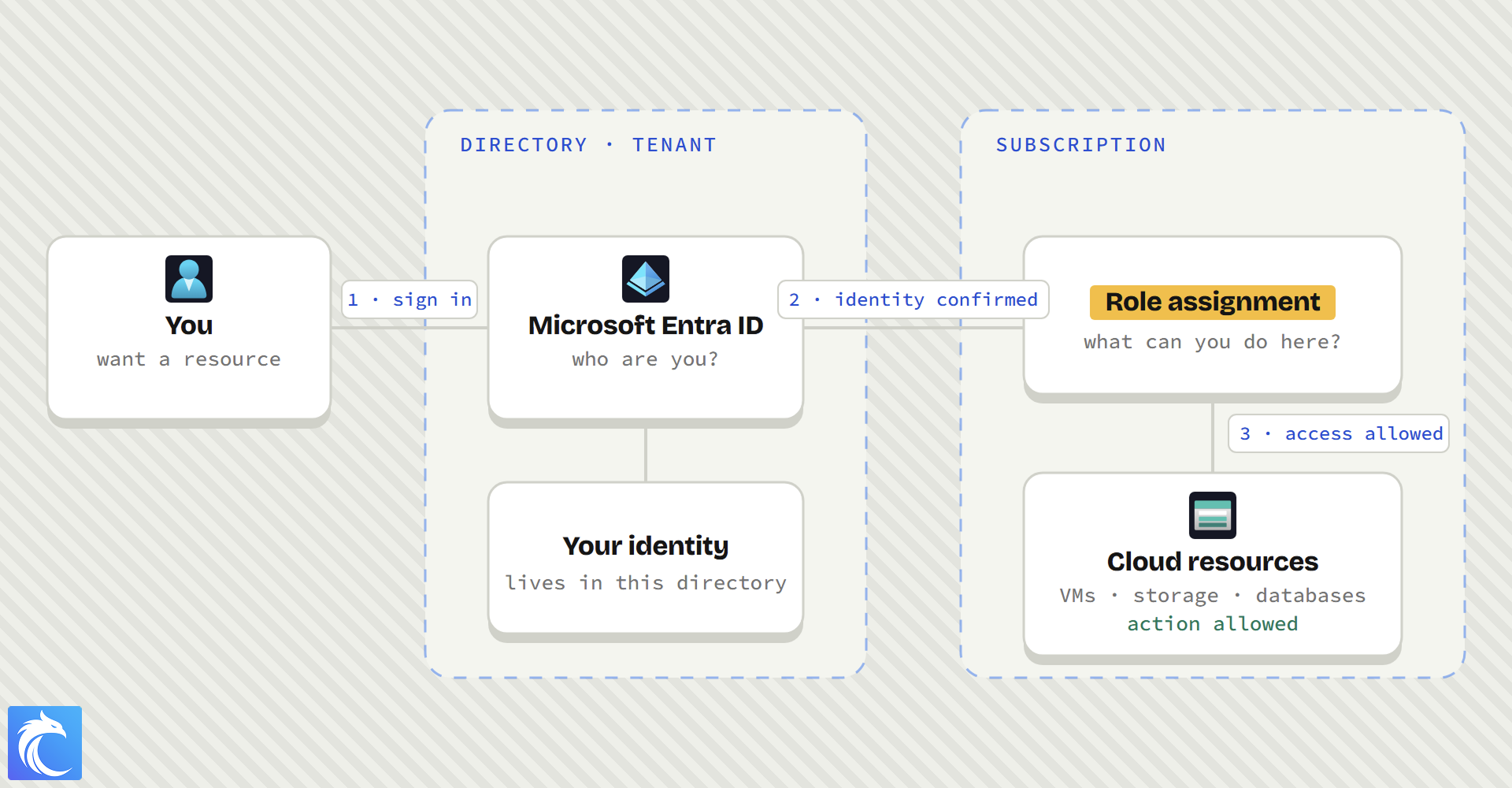
A subscription ID alone does not give access. You also need an identity in the connected directory and a suitable role.
One directory can support many subscriptions
A company often uses one directory for its workforce. The same company can use separate subscriptions for production, development, teams, or projects.
Employees keep one identity in the directory. Administrators give that identity roles in the subscriptions that the employee needs.
For example, an engineer can read production resources and manage development resources. The same identity has different roles in each subscription.
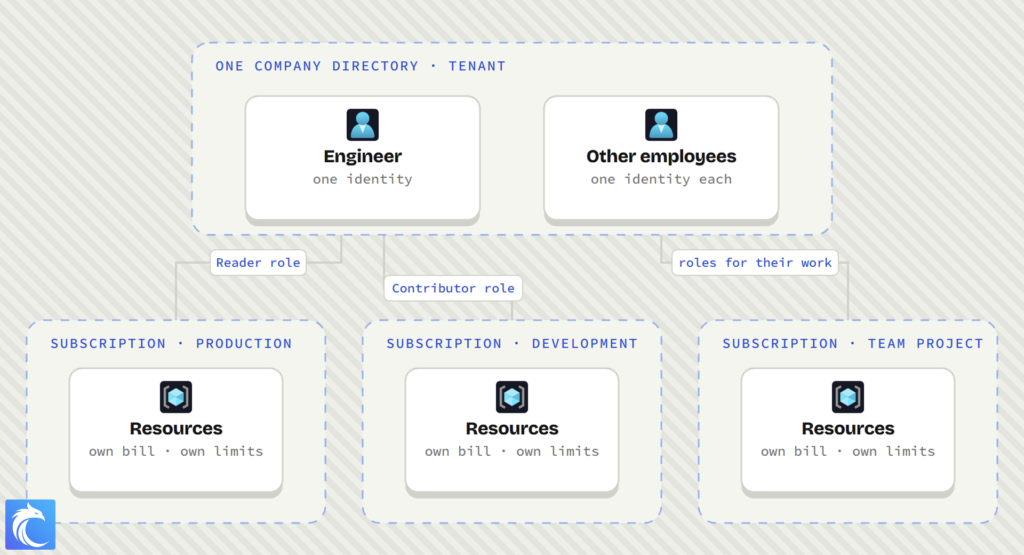
This design keeps identity management in one place. It also separates resources, costs, limits, and access between subscriptions.
What to remember
- A directory holds identities.
- A tenant is another name for a directory.
- Microsoft Entra ID manages the directory.
- A subscription holds resources and receives the bill.
- A subscription connects to one directory at a time.
- One directory can connect to many subscriptions.
- A role assignment controls what an identity can do at a scope.
Next: your first day in Azure
On Day 1, you will enter an unfamiliar Azure environment as a junior cloud analyst.
You will find the directory, subscription, resource groups, and resources in the portal. Then you will use your assigned access to complete real work.
You do not need to memorize or fully understand every term today. Remember the model: identities live in the directory, and resources live in the subscription.
See you tomorrow!
I have learnt about tree hierarchy of identity subscription resource group and resource
I spent hours on YouTube videos but couldn’t get it. this single chapter made it crystal clear.
Thank You
That’s awesome! Love it when that happens. Happy learning
Thanks for producing this Christophe, I’ve been slack with learning lately but this has re-engaged me now to learn this.