AWS CloudTrail CLI [Cheat Sheet]
Here’s a CloudTrail CLI cheat sheet in both downloadable image format and text format for reference. AWS CloudTrail Downloadable CLI Cheat Sheet Please note this…

Here’s a CloudTrail CLI cheat sheet in both downloadable image format and text format for reference.
AWS CloudTrail Downloadable CLI Cheat Sheet
View the CloudTrail CLI cheat sheet →
Please note this is not a comprehensive list of all commands or how to use them. These are some of the most commonly used commands and scenarios. If you’re looking for a full list of CloudTrail CLI commands, refer to the official documentation.
General and Operational Commands
List trails in your AWS account:
aws cloudtrail list-trailsShows settings for one or more trails for the specified region (or current region if not specified):
aws cloudtrail describe-trails [--trail-name-list <value>] [--region <value>]Create a new trail
aws cloudtrail create-trail --name <value> --s3-new-bucket <value> [--include-global-service-events] [--is-multi-region-trail] [--enable-log-file-validation] [--cloud-watch-logs-log-group-arn <value>] [--cloud-watch-logs-role-arn <value>] [--kms-key-id <value>]List names and settings of all trails:
aws cloudtrail describe-trails [--output json] Get the status of a trail:
aws cloudtrail add-tags —resource-id <value> —tags-list “Key=log-events,Value=management”Event History and Insights Events
See a list of the latest events in JSON format
lookup-events —max-items 1 [--output json]Instead of a max, you can specify a time range
lookup-events --start-time <timestamp> --end-time <timestamp>Example
aws cloudtrail lookup-events --start-time "2023-11-15, 5:00PM" --end-time "2023-11-15, 6:00 PM" --output jsonWe can also query by using a single attribute, like this:
aws cloudtrail lookup-events --lookup-attributes AttributeKey=<attribute>,AttributeValue=<string>Example – you think an access key has been compromised and has been used by a threat actor. You can query the last 10 events related to that access key like this:
aws cloudtrail lookup-events --lookup-attributes AttributeKey=AccessKeyId,AttributeValue=EXAMPLE_KEY_ID_HERE --max-items 10Working with Trails
Log file location:
bucket_name/prefix_name/AWSLogs/Account ID/CloudTrail/region/YYYY/MM/DD/file_name.json.gzSearch through log files manually:
Example (uses jq)
find . -type f -exec jq '.Records[].userIdentity.arn' {} \;This will search all files in our directory, then run the jq command looking for userIdentity.arn. Note that this is case sensitive, so if you capitalize the User for example, it won’t find anything.
Example
find . -type f -exec jq -r '.Records[] | [.eventTime, .sourceIPAddress, .userIdentity.arn, .eventName] | join(" -- ")' {} \; | sortCloudTrail Lake
Crete and manage event data stores
create-event-data-store --name [--advanced-event-selectors <value>]Return info about a specific event data store:
get-event-data-store --event-data-store <value> # The ARN (or ID suffix of the ARN)List all event data stores
Returns an array of EventDataStores[]
list-event-data-storesStarts/stops ingesting live events for a specific event data store:
start-event-data-store-ingestion --event-data-store <value> # The ARN (or ID suffix of the ARN)
stop-event-data-store-ingestion --event-data-store <value>
Create a channel to ingest events from a partner or external source.
create-channel --name <value> --source <value> --destinations <value> # Event data stores to send events from this channel toReturns a channel’s info:
get-channel --channelList all channels:
list-channelsReturns metadata about a query:
aws cloudtrail describe-query --event-data-store ac1e7a13-… --query-id 95f234dd-…Get the results of a query run in Lake
get-query-results --query-id <value>Example
aws cloudtrail get-query-results --query-id 95f234dd-…List all queries run in the last 7 days
list-queries --event-data-store <value>Example
aws cloudtrail list-queries --event-data-store 2cbe7a73-…Imports data from logged trail events in S3 to an event data store for Lake queries:
start-import [--destinations <value>] [--import-source <value>] [--start-event-time <value>] [--end-event-time <value>]Runs a CloudTrail Lake query
--query-statement is the SQL code to run--query-parameters is the list of query parameters
start-query [--query-statement <value>] [--delivery-s3-uri <value>] [--query-parameters <value>]Insights Events
Enables Insights event logging for an existing trail or event data store --insights-selectors are the insights types you want to log (APICallRateInsight and/or ApiErrorRateInsight):
put-insight-selectors [--trail-name <value>] --insight-selectors <value> [--event-data-store <value>] [--insights-destination <value>]Retrieve settings for Isngihts event selectors configured for trails or event data stores:
get-insight-selectors [--trail-name <value>][--event-data-store <value>]Record Contents
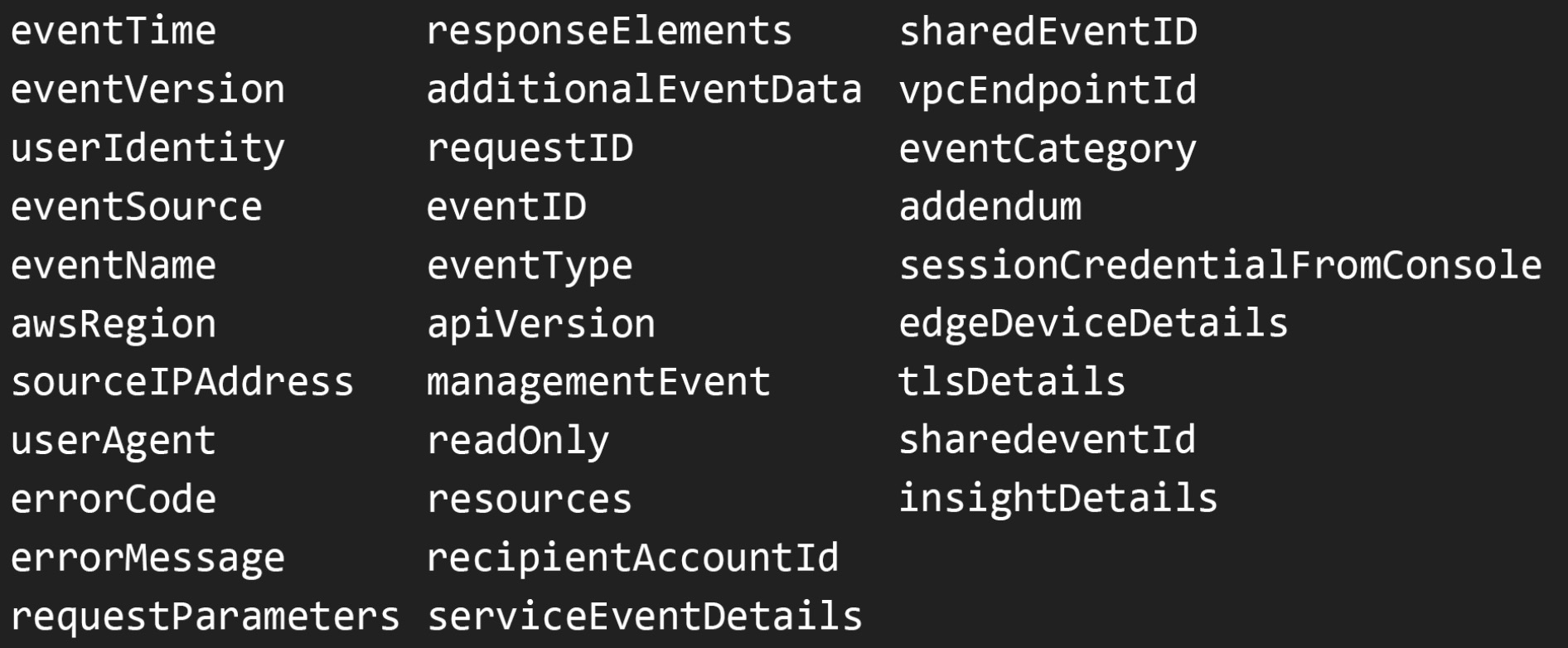
Records that make up CloudTrail log events:
Learn how to use and configure CloudTrail properly for security with our free course: