AWS SCS-02 Practice Exam Questions With Detailed Explanations
Studying for the AWS Certified Security Specialty (SCS-02) certification exam? Practice and challenge your readiness with our free practice exam questions. We’ll be adding a…

Studying for the AWS Certified Security Specialty (SCS-02) certification exam? Practice and challenge your readiness with our free practice exam questions.
We’ll be adding a few more questions to this post as time goes by, so feel free to check back in. We’ve also got more available as a sample free test here.
Question #1: Troubleshooting issues with rotating secrets
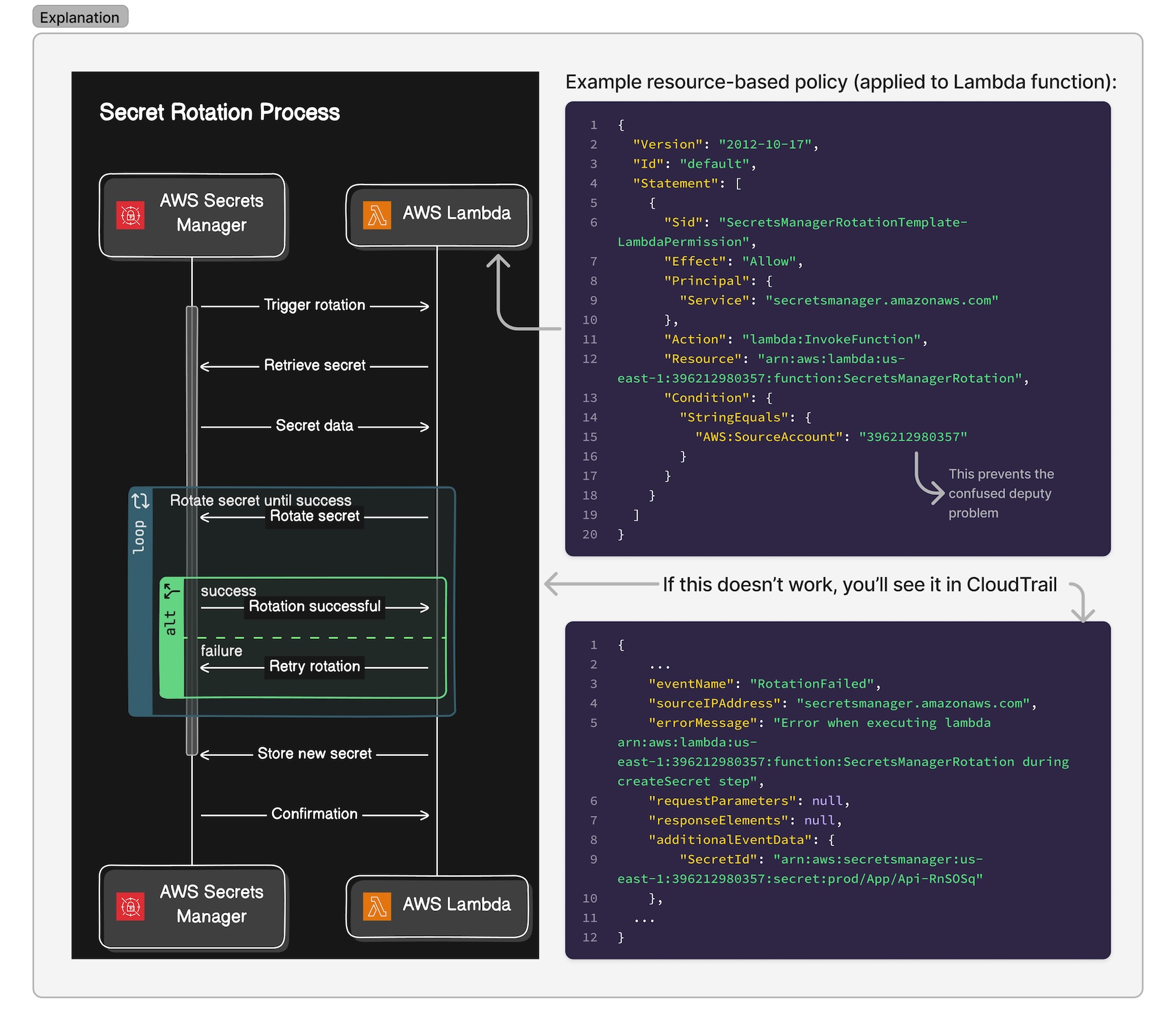
A software company is implementing AWS Secrets Manager to manage API keys for various third-party services. They’ve created a custom Lambda function to handle the rotation of these API keys. The DevOps team has set up a secret in Secrets Manager and configured it for automatic rotation every 30 days. When they manually invoke the Lambda function to test, the secret successfully rotates. However, it does not appear to be rotating automatically. When looking at CloudTrail logs, they see the following:
{
    ...
    "eventName": "RotationFailed",
    "sourceIPAddress": "secretsmanager.amazonaws.com",
    "errorMessage": "Error when executing lambda arn:aws:lambda:us-east-1:396212980357:function:SecretsManagerRotation during createSecret step",
    "requestParameters": null,
    "responseElements": null,
    "additionalEventData": {
        "SecretId": "arn:aws:secretsmanager:us-east-1:396212980357:secret:prod/App/Api-RnSOSq"
    },
...
}
The team confirms that the Lambda function exists and that the rotation code functions as expected since they are able to manually execute the function. What is the MOST likely cause of this error?
- The Lambda function’s IAM execution role lacks permission to access Secrets Manager
- The secret’s KMS encryption key doesn’t allow Secrets Manager to use it
- The resource policy for the rotation function doesn’t grant the service principal (
secretsmanager.amazonaws.com) access to thelambda:InvokeFunctionpermission - The Lambda function is in a different region than the secret in Secrets Manager
- The Lambda function’s timeout is set too low for the rotation process to complete, causing it to error out before it’s able to rotate the secret
Answer #1: Troubleshooting issues with rotating secrets
(Don’t read this part if you’re not ready to see the answer!)
The correct answer is C) The resource policy for the rotation function doesn’t grant the service principal (secretsmanager.amazonaws.com) access to the lambda:InvokeFunction permission
Explanation #1:
- C) The reason it’s C is because if you create a function but you don’t give Secrets Manager the ability to execute that function on your behalf in its trust policy, then it won’t be able to rotate the secret automatically since Secrets Manager won’t be able to invoke the function. Since your DevOps team is able to successfully rotate the secret by manually executing the Lambda function, as stated in the scenario, that helps us narrow down the issue to a permissions issue instead of some of the other potential answers.
- A) Can’t be right because the DevOps team is able to execute the function manually. It just doesn’t work when Secrets Manager tries to invoke the function
- B) Same as above — if the KMS encryption key didn’t allow Secrets Manager, they wouldn’t be able to execute the function at all
- D) Same as above
- E) Same as above
More info about troubleshooting AWS Secrets Manager rotation is available in the AWS documentation.
Question #2: Managing secrets in CloudFormation templates
While reviewing your CloudFormation template, you’ve noticed that a static secret value is directly embedded in the template and used multiple times throughout.
What action should you take to eliminate the plaintext and hardcoded secret while ensuring it remains accessible within the template?
- Encrypt the secret using AWS KMS and use the encrypted value in your CloudFormation template.
- Store the secret in AWS Secrets Manager and retrieve it securely in your CloudFormation template using
{{resolve:secretsmanager:secret-id:SecretString:json-key:version-stage:version-id}} - Define the secret as a parameter in the CloudFormation template and pass its value at stack creation time using
{{resolve:ssm:parameter-name:version}} - Use AWS Systems Manager Parameter Store to store the secret and retrieve it securely in your CloudFormation template using
{{resolve:ssm:parameter-name:version}} - Use
AWS::CloudFormation::Initto store the secret value in the resource metadata and retrieve it during instance initialization.
Answer #2:
(Don’t read this part if you’re not ready to see the answer!)
The correct answer is 2) Store the secret in AWS Secrets Manager and retrieve it securely in your CloudFormation template using {{resolve:secretsmanager:secret-id:SecretString:json-key:version-stage:version-id}}
Explanation #2:
- You can store secrets in AWS Secrets Manager and then use a resolver in your CloudFormation template to have CF automatically fetch the secret when it’s needed. This is also called a dynamic reference
- Using KMS for this, while technically possible with some custom built stuff, is completely overkill and unnecessary
{{resolve:ssm:parameter-name:version}}can be used to store stuff in SSM and to retrieve it in templates, butssm:is not to be used for secrets as it would be visible in plaintext. Instead, you’d want to use{{resolve:ssm-secure:parameter-name:version}}. A subtle, but important difference.- Setting up in
AWS::CloudFormation::Initwould reveal in plaintext. This lets you include metadata on an EC2 instance for the cfn-init helper script. Metadata info is not protected